How (and Why) I Built This
I built this personal website from scratch using AI. It has a conversational homepage instead of a static layout – visitors type questions and get routed to the relevant section, or get an answer from an LLM informed by a curated knowledge base. There are two content tracks: written work under product management and a photography section split into series and single shots. All content is manageable from a built-in admin panel without touching code or relying on a third-party CMS. A small-scale first-party analytics is available internally. This post covers the building process, the decisions behind it, and what working with AI on a personal project actually looks like.
There's a version of this story where I sign up for one of the content management systems, pick a template, edit a bio, upload photos, and call it done. I considered it for about two minutes.
Thing is, it's hard to settle for templates and limitations when you build products, have worked on content before, and seek a somewhat unconventional approach to hosting and guiding your portfolio page visitors. So, I built my own CMS with an admin panel that keeps me in charge.
What Is This Website About
One reason I never maintained a portfolio before is that I resisted being defined by a single pursuit. My career has spanned multiple fields, and each has shaped who I am as a product manager today. The biggest lesson: cultivating diverse skills not only strengthens your capabilities – it should happen in parallel with developing deep expertise in your chosen direction.
A couple of months ago I came across InstantDB, while researching database options for a work project involving complex, frequently updated, and non-uniform data operations. While it wasn’t something I could use for my then-requirements, I made one of those mental bookmarks every PM makes once in a while – something to try outside the constraints at hand. That opportunity arrived when I started building this project.
The scope narrowed to two goals: build something genuinely functional and expandable, and do it using AI – which has become a part of how I work as a PM.
My objective was to serve recruiters, potential collaborators, and anyone who visits the site with equal care. The space needed to guide visitors through different sections of my career path, give me complete control over my content, and be flexible enough to grow. A static hero page with a bio and PDF resume wouldn't suffice.
Setting Up the Workspace
I have been working with Claude Code for around 5 months now. The biggest learning I've had – alongside its undisputed usefulness – is that how you set up your project determines not only the quality of the output, but the time and tokens you spend getting there.
Early on I invested effort in preparing a claude.md file – a markdown file that provides persistent, contextual instructions. It defines standards and expectations that improve efficiency and reduce repetitive re-prompting. By setting up project-specific memory, I gave Claude custom commands and guidelines that persisted across sessions, so I didn't have to re-explain the whys, whats, and hows to Claude every time.
Requirements before building
As a PM, refining PRDs has probably been one of the first use cases where incorporating AI has shown its value – you might have heard of chatprd.ai. There are myriad repositories with requirements-writing Claude skills (and custom GPTs), some better than others. In my experience, skills become dramatically more useful when you build them yourself around how you actually work.
Early in the project, it was clear I didn't need to make a statement with my base stack, instead I conceptualised what needed to be built:
A conversational homepage replacing the standard hero layout – visitors type a question and get routed to the relevant section or get an answer from Claude “trained“ on my knowledge base.
Site navigation and interaction patterns that guide without interrupting – visible when needed, absent when not.
UX/UI designed to match visitor intent rather than follow a fixed single-scroll sequence.
Long-form writing with a proper reading experience – a rich editor with full control over content formatting and structure.
An image warehouse – photography organised as individual works and curated series, each with its own presentation context.
A fully self-contained admin interface requiring no third-party CMS, allowing me to edit all content blocks – posts, photos, and page copy.
Built-in analytics tracking visitor data and post engagement metrics, accessible through the admin dashboard.
A playground – as a reminder to keep exploring and sharing the fun.
How I Used Specialised AI Sub-Agents
Where I brought in specialised AI assistance was for specific development tasks. I used project-specific sub-agents trained as language specialists and core development experts with quality and security knowledge.
Dedicated Next.js, React, and TypeScript sub-agents – frontend and full-stack specialists – tackled key tasks: implementing the App Router architecture, managing real-time data sync between the admin CMS and public pages, extending the rich text editor with custom block types, sequencing Framer Motion animations while maintaining accessibility, and optimising the photography section's image loading behaviour.
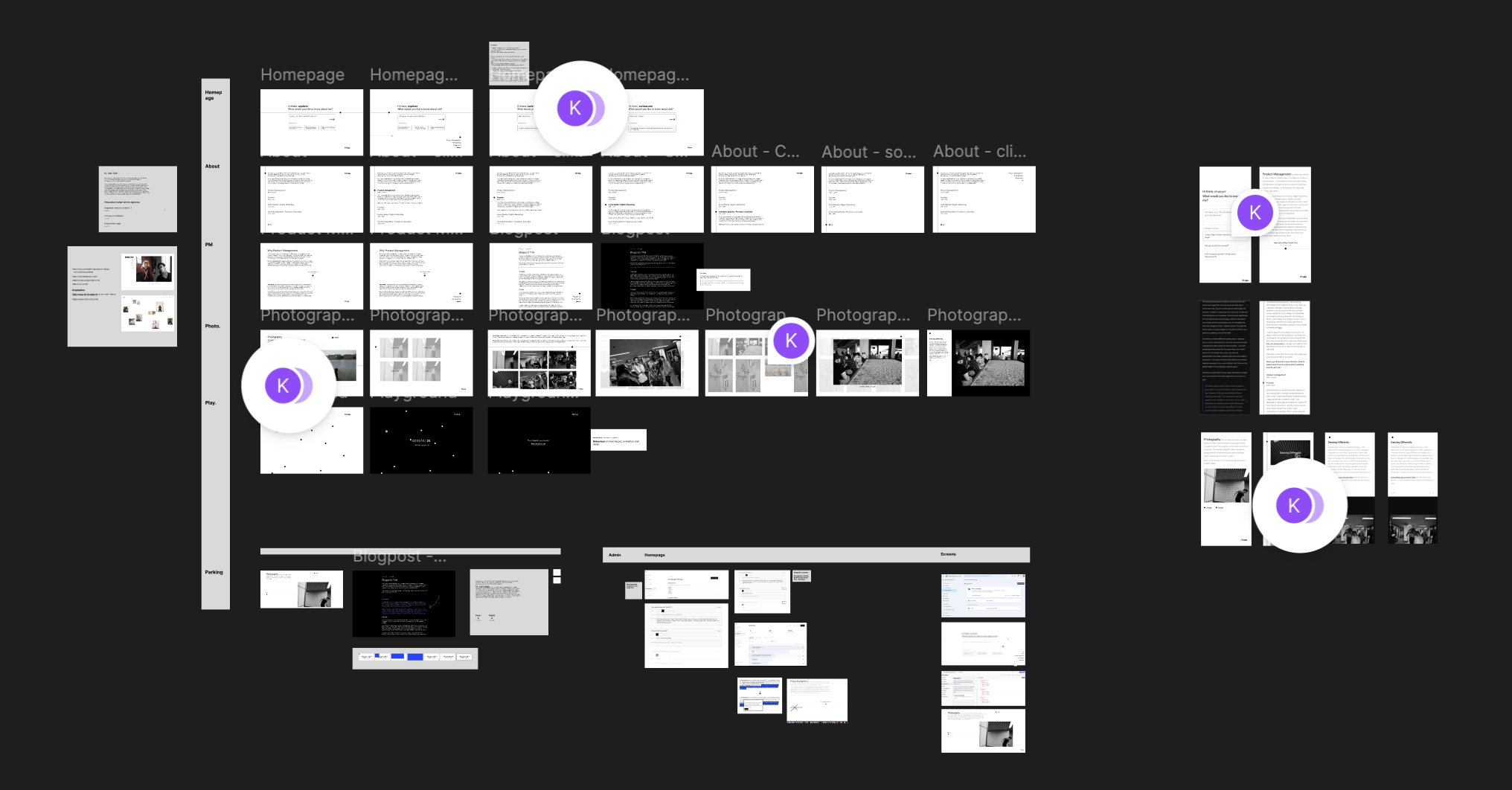
Connecting Figma MCP to Claude let me transfer wireframes and design decisions directly. Claude read the Figma file as live context instead of relying on my descriptions. When designs evolved, Claude automatically stayed current without needing re-briefing. This proved especially valuable for complex logic – homepage interactions, photography grid behaviour, and dynamic navigation – where visual intent matters most.
I could think in the medium that suited the problem, meaning my design decisions stayed where they belonged.
The Homepage – Why a Static Layout Wasn't Enough
A static hero page wouldn't adequately showcase my creative process. Instead, the prompt box invites visitors to engage in something far more interesting: a conversation that guides them through the website's content. Visitors can ask questions and be directed to relevant pages, or an AI trained on a curated knowledge base can answer questions that don't have a direct path.
The design prioritises a dynamic, intuitive navigation experience and a consistent visual language – including the guiding dot used throughout site navigation.

Layer 1: Configuration – Live from the Database. All homepage content (greeting words, suggestion prompts, topic routes, scenario responses) lives in InstantDB and is editable from the admin. Nothing is hardcoded.
Layer 2: Suggestion Prompts. When a visitor types something and submits, a classifier maps the input to the right section of the site. If nothing matches, a fallback answer kicks in. The three prompt cards visible at any time are shuffled from a larger pool, with fixed positions available when I want to direct attention somewhere specific.
Layer 3: The AI Knowledge Base – Claude via API. For questions the site content doesn't directly answer, I use Claude Haiku informed by a small knowledge base I manage from the admin. The knowledge base is a set of context blocks (JSON array) – each with a theme, content, and an on/off toggle. I can add new blocks as my work evolves without touching code.
Including Claude required implementing a rate limit. Before the server processes any question with Claude, it checks InstantDB for a rateLimits record keyed by the visitor's IP and today's date — if the count has reached the daily cap, the request is rejected before Claude is ever called.
The Admin – Control, Security, Analytics
Everything on this site – from homepage configuration and prompt suggestions to their visibility and prioritisation, the site map, individual sections with their copy, blog posts, photos, and related text – is manageable through a custom-built admin panel.
I wanted maximum flexibility to manage all content and a foundation to potentially expand the site's purpose over time. Built-in analytics meant I can consult engagement metrics without relying on an external service.
Locking the back door
InstantDB is a real-time database with a client-side SDK – queries and subscriptions run directly from the browser, which introduces specific security considerations. By default, data is accessible without authentication – fine for public reads, but any write or admin operation requires deliberate permission rules.
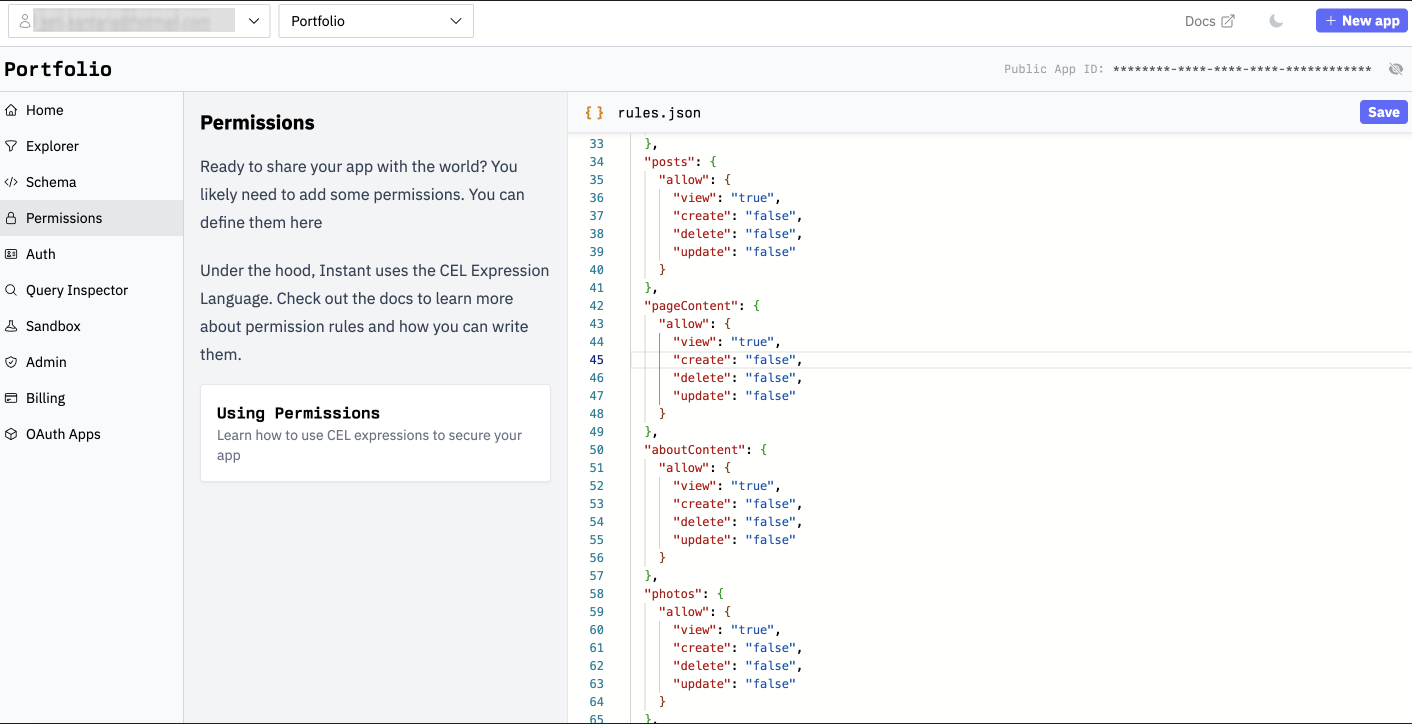
Admin access is protected by GitHub OAuth, with an emergency password route as a fallback. Both issue a signed JWT stored in an httpOnly cookie. Every admin API route independently verifies this JWT server-side before any write touches the database.
Analytics in Admin
Adding a third-party analytics tool wasn't justified at this stage – I could build what I actually needed and own the data outright. Every page visit is tracked server-side, with geo data derived from Vercel's edge headers, so I can see where visitors come from without storing IP addresses. No cookies, no consent banners, no vendor dependency.
The tracking itself has a few deliberate guards built in: my own visits are filtered out (via localhost detection and an admin flag), visitors who leave in under 2 seconds – bots, prerender requests, instant bounces – are never recorded, and a 30-second session debounce prevents React StrictMode double-fires and rapid navigation from inflating the numbers. What remains is a reasonably clean signal.
Each raw event – path, timestamp, referrer, country, city – gets written to InstantDB. The admin dashboard then reads the full collection as a live subscription and does all the computation client-side: grouping by page, by day, by referrer, by location. It updates in real time as new visits come in.
Obviously, there is a trade-off: loading every raw event into the browser works fine at portfolio scale, but has a natural ceiling. If traffic grew significantly, I'd need to move to server-side aggregation. For now, the solution is the right call. However, as a PM, I've noted it as a future rework trigger if traffic grows.
Discoverability and SEO
For a portfolio, SEO isn't really about ranking for keywords. The goal was making sure the site behaves correctly when my name is searched, and that shared links show up with the right context rather than a blank card. That said, a consistent writing pipeline (sharing blogposts) changes the equation – posts on specific topics can surface in searches independent of my name and bring visitors to the site directly.
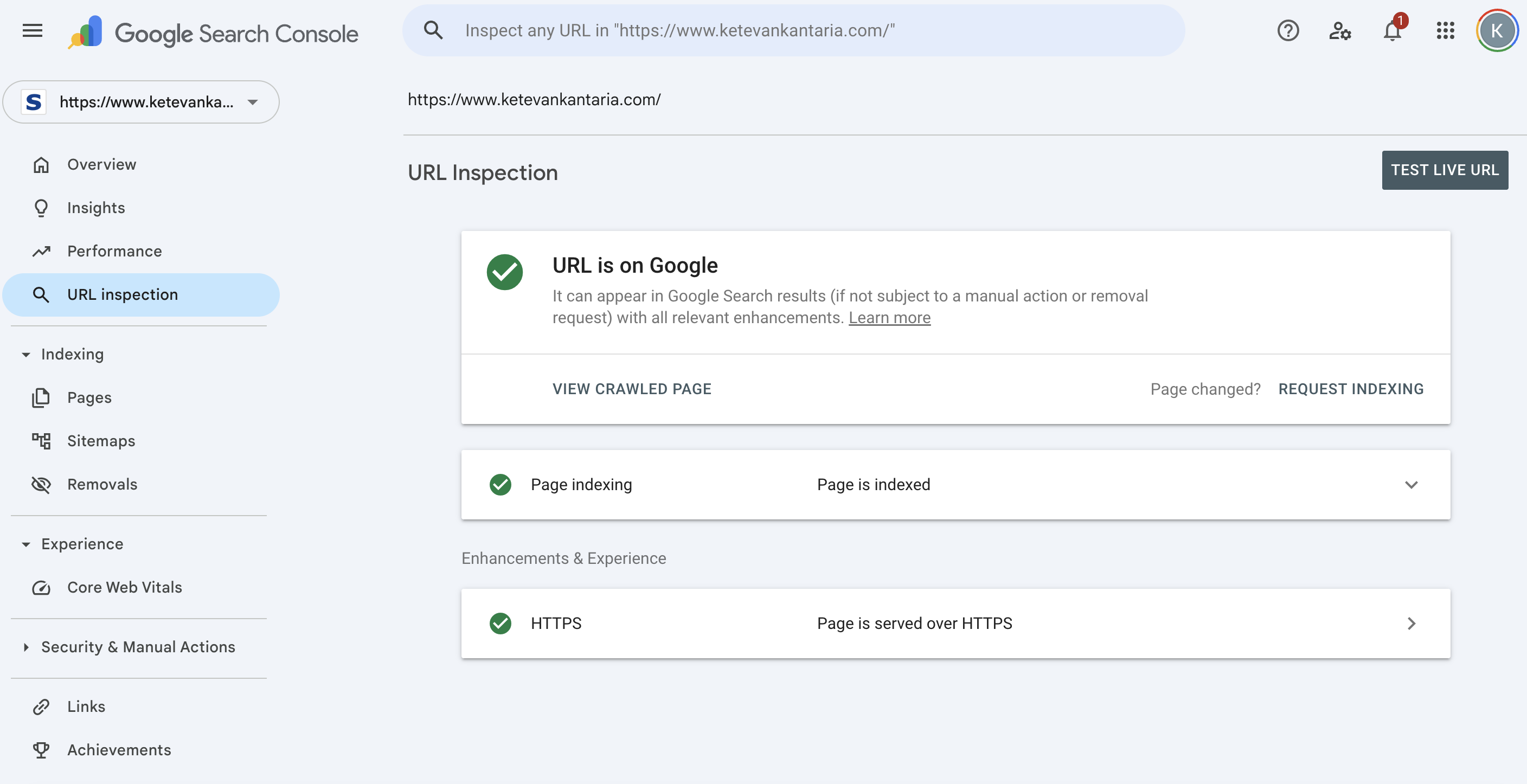
Blog posts generate their own title, description, and preview image automatically from the post content. I also added structured data – a way of telling Google what kind of thing each page is: a person, a website, an article – which affects how the site appears in search results. The sitemap updates itself on every new publish, and the site is connected to Google Search Console to confirm indexing and monitor what's actually bringing people in.
Photography – Organising Images
Photography presented a different kind of challenge – photos are large files, and how you store and serve them has a real impact on how fast the site loads. The solution I landed on separates two concerns: the photos themselves live on Cloudinary, a service built specifically for storing and delivering images, while the database only stores a link to each photo plus its metadata like title and category. When I upload a photo through the admin panel, it goes straight to Cloudinary and the site saves the address, not the file itself.
Cloudinary handles different display sizes. I upload a photo once at full resolution, and the site automatically requests the right version for each context – a smaller compressed thumbnail for the grid view, a full-width version for the detail view, and a neutral grey placeholder that shows instantly while the real image loads – no jumping, no blank space, just a smooth fade in.
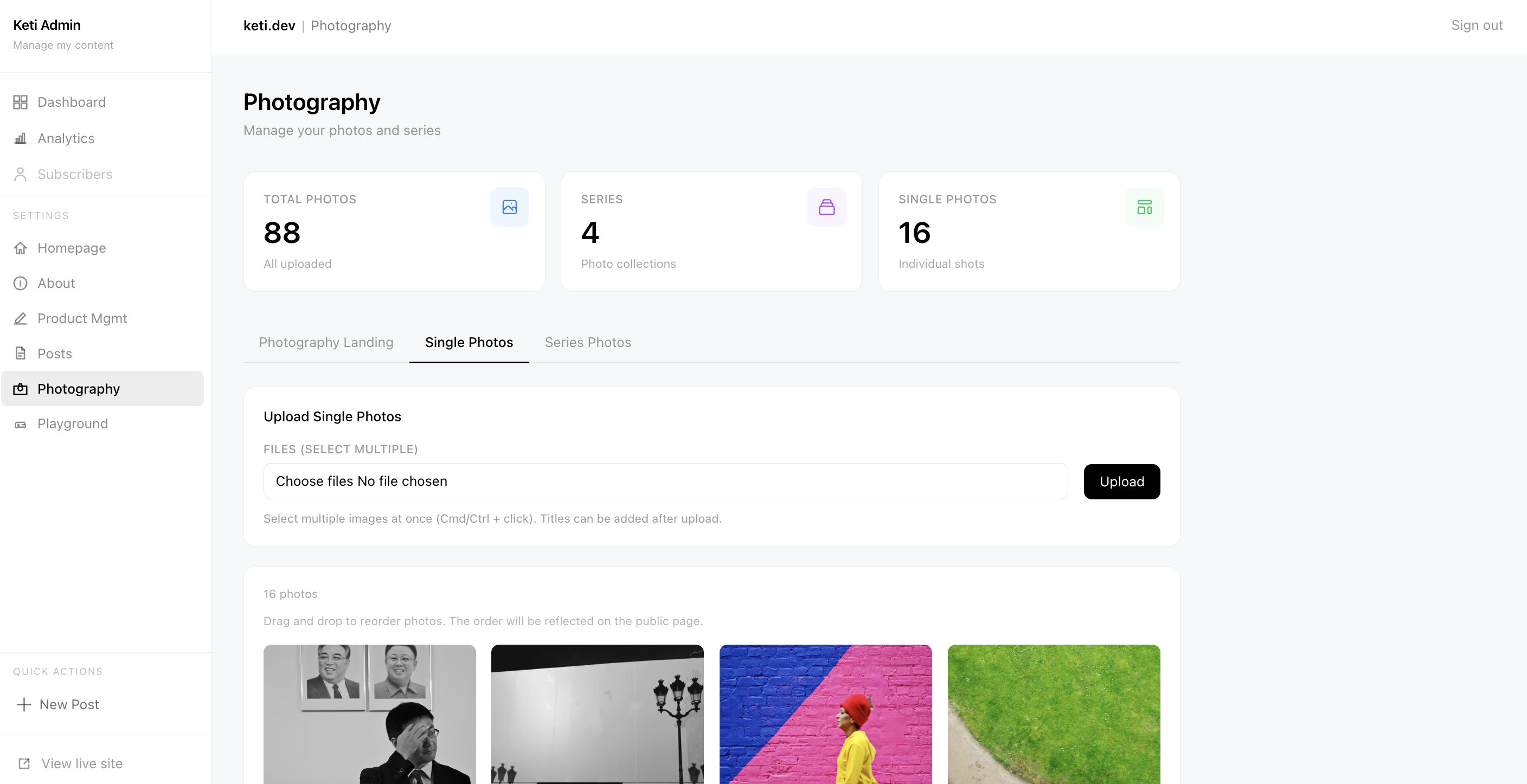
Photos are organised into two types: standalone singles and named series. The series page shows photos in a grid.
The admin side is where this all comes together practically. I can upload a photo, add its details, and see it appear in the grid immediately without refreshing the page – the database pushes the update to the interface in real time. I can re-order the photos as I please. It's the kind of thing that sounds small but makes a big difference when you're actually managing a growing collection.
 1 / 2
Bonus – What Happens When You Can't Stop Tinkering
🎮 The Playground
Have you tried my bubble-popping game? It started as an experiment with Framer Motion and evolved into a personal reminder to keep the fun in my work. The leaderboard is open, so you can compete for the record score – which yes, I do track.
✏️ The AI Text Improver
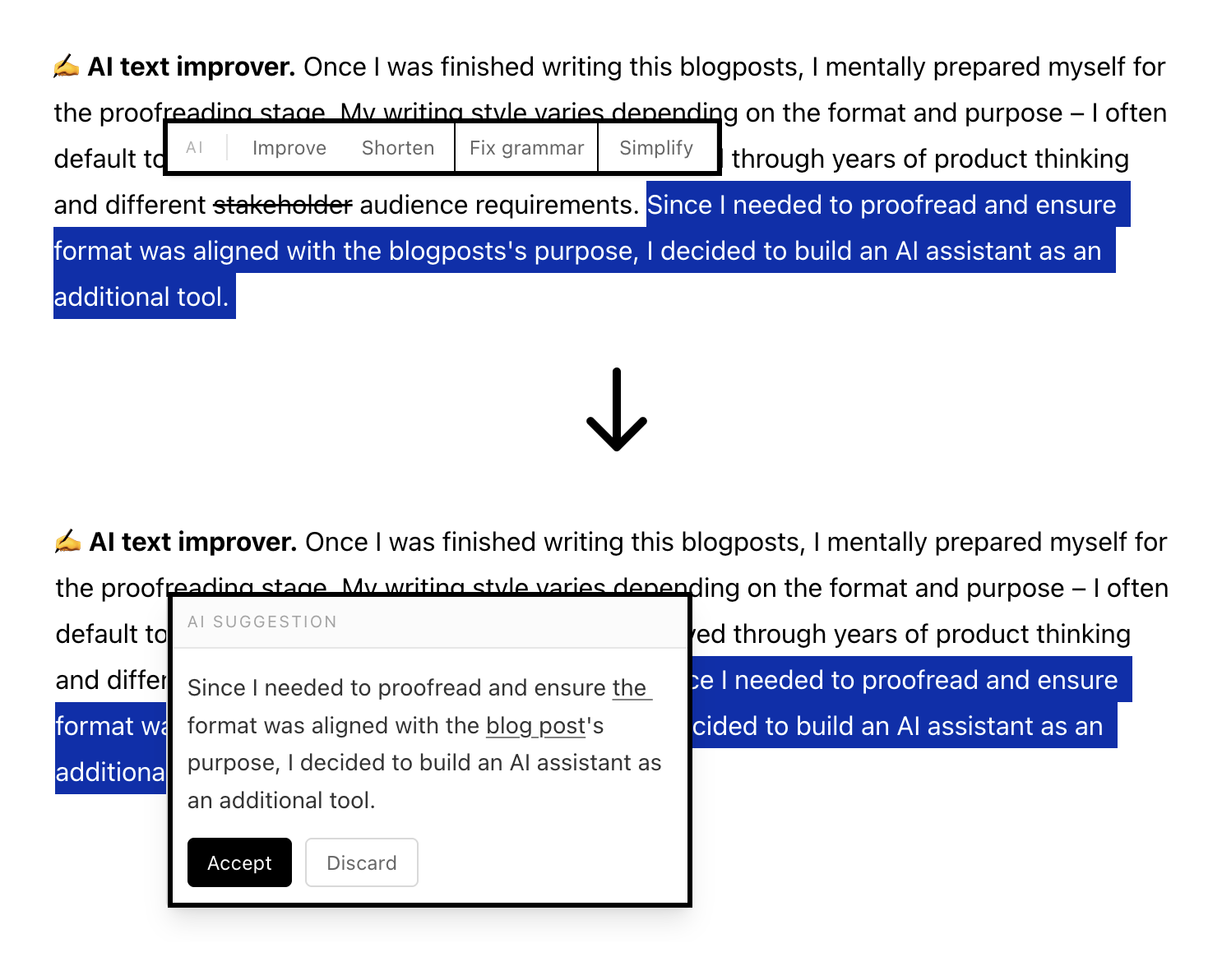
Once I finished writing this post, I mentally prepared myself for the proofreading stage. My writing style varies depending on format and purpose – I often default to a journalism-inspired approach that has evolved through years of product thinking and different audience requirements. Since I needed to proofread content and make sure the format aligned with the blog's purpose, I decided to build an AI assistant as a complementary tool inside the editor.
It triggers an Anthropic API call with four modes: Improve, Shorten, Fix grammar, Simplify. I can select text, choose a mode, and an inline suggestion appears with Accept / Discard. It incurs a cost, but even with heavy monthly usage and hundreds of daily clicks, the expense remains negligible and well worth it.
🌙 Details Matter
You will also notice small details, part of the thought-out user experience, like the dark mode available in blogpost, mobile navigation friendly text fades, etc. Fun fact: the design uses only one accent colour beyond black and white: International Klein Blue (IKB), the intensely saturated blue that French artist Yves Klein developed and trademarked in 1960.
Final Words
"Building with AI" is probably the most overused phrase today. However, if you want solid coverage of your feature or project, you'll need more than just prompting – a minimum understanding of Terminal setup and IDE familiarity would help. I've personally relied more heavily on Cursor after switching from VS Code. The AI landscape is still evolving, with different models claiming leadership in specific areas. While it's tempting to default to whichever tool matches your work style, this approach is flawed.
While working on this project, I benchmarked multiple models using problem-solution outlines. Claude (4.6 Opus/Sonnet) and Gemini (3.1 Pro/Flash) performed best overall, though I recommend to always cross-reference the results.
* * *
As a Product Manager, most of the time you are caught in the balancing act between what should be built and what you want to build, between constraints and creativity, between roadmaps, priorities, tech debt, and so on. Building this site was a rare chance to work with less of that friction.
While AI makes building much more accessible and fast – speeding up execution – it is fundamentally different when you can apply professional knowledge to it. For product management, that means the core skills – knowing which problem to solve, how to frame it, and what “good“ looks like – matter more, not less. AI raises the ceiling for what a PM can ship, but it doesn't lower the bar for what they need to know.
Resources